box sleeve design template
Showing the single result
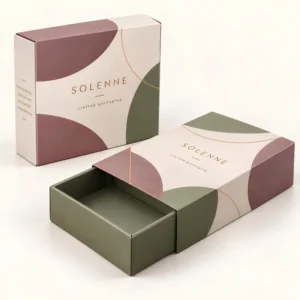
A box sleeve design template is the flat layout that shows exactly where artwork, text and logos sit on a printed sleeve before it wraps around a box. Using a box sleeve design template prevents the common errors of logos crossing folds, text sitting too close to a cut edge and panels appearing in the wrong order. Custom Postal Boxes supplies printed sleeves with free design support, so the template and the finished sleeve are checked together.
How a box sleeve design template is built
A sleeve is a band of board that slides or wraps around a box and is joined at a glue flap. The template therefore shows four main panels in a row, plus the glue flap at one end. Each panel corresponds to a face of your box, so the front panel carries the main branding, the narrow side panels often carry product details or a flavour or colour name, and the back panel can hold ingredients, instructions or a barcode. Thinking in panels at the layout stage stops the mistake of designing one long picture that ignores where the folds will fall.
Lines every template should show
Five guides matter on every template. The cut line marks where the board will be trimmed. Fold lines mark where panels bend around the box corners. The bleed area extends background colour or imagery beyond the cut line so no white edge appears after trimming. The safe area sits inside each panel and keeps text and logos clear of folds and edges. The glue flap is marked so artwork there is not expected to stay visible after joining.
Why board thickness changes the template
Board thickness affects how a sleeve folds and how much allowance each fold needs. A template drawn for a thin card will not wrap a thick board cleanly, because the outside of each fold travels further than the inside.
Measuring your box and setting up artwork
Measure the closed box you will actually use, in millimetres, and record its length, width and height. Decide whether the sleeve wraps around the height of the box or around its length, because that choice sets the panel order and the sleeve width. If the sleeve must slide on and off, a small clearance helps it move without scuffing, while a sleeve that stays in place during posting can fit more closely. Our custom sleeve boxes are made to the size of your box, and sleeves are often paired with plain or printed boxes from the custom mailer boxes UK range.
Artwork habits that prevent print problems
Keep the dieline on its own layer and design on separate layers beneath it, so the guides can be hidden or shown without disturbing the artwork. Supply logos as vector files where possible and use images with enough resolution for print at final size. Keep small text away from folds, allow backgrounds to run fully into the bleed and check spelling on every panel, including the narrow sides that are easy to overlook. Brands that also use printed postal boxes often keep one artwork system across box and sleeve so colours and logo positions match across the range.
Materials, print and responsible choices
Sleeves are usually printed on card or kraft board. White card gives bright colour reproduction for detailed artwork, while kraft board gives a natural look that suits food, craft and gift brands. UK businesses that place packaging on the market should also understand their duties under the GOV.UK guidance on extended producer responsibility for packaging, which encourages reducing unnecessary packaging and designing packaging that can be recycled.
Pricing for printed sleeves depends on size, material and quantity, and the business works on a quote basis with low minimum order quantities and free UK delivery. If you have a box size and artwork idea ready, request a quote through the contact page for a sleeve quote and the team will confirm a template drawn for your exact box, with free design support to check your artwork before print.
FAQs about box sleeve design template
What is a box sleeve design template used for?
A box sleeve design template is used to lay out artwork on the flat shape of a sleeve before it is printed, cut and folded around a box or product. It shows every panel in its true position so logos, text and images land correctly once the sleeve is wrapped and glued.
What should I check on a box sleeve design template before printing?
Check that text sits inside the safe area, that background artwork reaches the bleed edge, that fold lines carry no important detail and that the glue flap stays clear of print that must remain visible. Print the template at full size and fold a test sleeve around your actual box.
How do I measure a box for a sleeve template?
Measure the length, width and height of the closed box in millimetres, then note which faces the sleeve must cover as it wraps around. Share those measurements when you request a quote so the template panels and the glue flap allowance match your box rather than a generic size.
Can a sleeve refresh plain boxes without reprinting the box itself?
Yes. A printed sleeve can carry a new campaign, a seasonal message or updated branding while the box underneath stays the same. This suits brands that hold plain stock and want flexibility, because only the sleeve artwork changes between runs.