
drawer box packaging template
Showing the single result
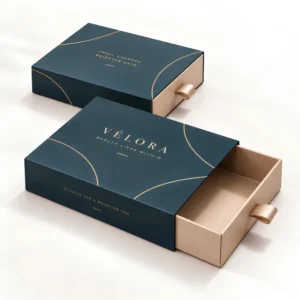
A drawer box packaging template is the flat layout, often called a dieline or cutter guide, that shows where a drawer box sleeve and tray are cut, folded and glued so artwork can be placed accurately. Custom Postal Boxes offers free design support from Wolverhampton to help you set artwork on the correct template before print.
What a drawer box packaging template shows
Every drawer box packaging template has two parts, because the finished pack has two pieces. The sleeve template shows the outer wrap that forms the case, and the tray template shows the drawer that slides inside it. Lines on the template mark where board is cut, where it folds, where glue is applied and where artwork must stop. A bleed area extends background colour past the cut line so no white edge appears after trimming, and a safe area keeps text and logos away from folds and edges. Our finished formats include custom drawer boxes and custom sleeve boxes.
Reading cut, fold, bleed and safe area lines
Cut lines show the final edge of the flat board. Fold lines show where the board bends to form walls and the sleeve wrap, and artwork that crosses a fold will bend in the finished box, so keep faces of people, small text and straight rules off the folds. Glue areas should stay free of heavy ink coverage and finishes that can weaken a bond. Background images and colour should run into the bleed on every open edge.
Why the tray and sleeve templates differ in size
The tray must slide freely, so its outside measurements are slightly smaller than the inside of the sleeve, and the gap depends on board thickness and any paper wrap. Never scale one template to make the other, because a small scaling error becomes a drawer that sticks or rattles. Always work from a template created for your final internal size and board choice.
Setting artwork on the template step by step
Place the template on its own locked layer in your design file and build artwork on separate layers above it. Check the orientation of every panel before you design, because panels that look upright when flat can appear upside down once the sleeve wraps or the tray folds. Decide which end of the tray carries the pull, whether a ribbon or a thumb notch, and keep that end clear in the design. Proof the artwork as a printed flat sheet and, where possible, fold a paper mock up to check panel order. The rigid structures behind these templates sit in our custom rigid boxes range.
Common template mistakes and how to avoid them
The most frequent errors are artwork placed on the tray template at sleeve size, text sitting inside the fold area, missing bleed on one edge and logos centred on the flat sheet rather than on the finished panel. Each one is simple to avoid with a careful proof and a folded mock up. If you do not design packaging often, use the free design support and send your artwork and box size for checking before anything is printed. Pricing for the finished boxes depends on size, material and quantity, and a correct template protects that investment by preventing a wasted print run. Finished examples of the format are covered on our page about slide drawer box packaging.
FAQs about drawer box packaging template
What file format is a drawer box template supplied in?
Templates are normally worked with as vector files in formats such as PDF or AI, because the cut and fold lines must stay exact at full size. Keep the template on a separate layer and never resize it, because the dimensions carry the fit of the finished box.
Can I resize a template to fit a different product?
No. Resizing changes wall heights, glue flaps and the sliding clearance between tray and sleeve, so the finished box may not fold or slide correctly. Ask for a new template created for the new internal size and board thickness instead.
How much bleed should artwork include?
Background colour and images should extend past every cut line into the bleed area shown on the template, so trimming never leaves a white edge. Follow the bleed shown on your supplied template rather than a generic figure, because it is set for the board and process in use.
Where should the logo go on a drawer box?
The centre of the sleeve top panel is the main display area and the usual home for a logo. The tray front can carry a smaller mark or the product name, which the customer sees as the drawer opens.
Can you check my artwork before printing?
Yes. Free design support includes checking that artwork sits correctly on the template, with bleed, safe areas and panel orientation in order. Send your files with the finished internal box size you need and the team will advise on any corrections.